This is the official Blog of TutorialandExample.com. visit official site for more technical updates like as Machine Learning, Artificial Intelligence, Deep Learning, Python, Bigdata, Hadoop and BlockChain etc.
What is Blue Ocean in Jenkins? Blue Ocean is made on the grounds of the consumer's Jenkins experience. It's mostly made for the pipeline procedure, but it could also perform freestyle tasks. Blue Ocean lessens the disease and chaos brought on by the Jenkins and also raises the clarity for every team member. Blue Ocean is quite helpful for a completely proficient user that understands Jenkins features very nicely. Nonetheless, if you're just beginning, you might have to understand Jenkins's fundamentals , particularly concerning Jenkin's pipeline procedure. The title Blue Ocean is chosen in the publication >> " Blue Ocean Strategy ." Main characteristics of Blue Ocean Supports freestyle tasks: though it's made for the pipeline procedure, additionally, it supports freestyle tasks. Even it's possible to run a single task on it. Every member of the group can easily picture the implementation and modification made from the builds...
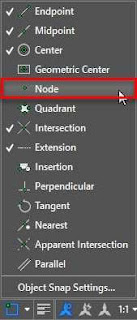
Point Command in AutoCAD Points in AutoCAD 2D may provide excellent reference points for additional drawings. In this post, we'll demonstrate how to construct single and multiple points in AutoCAD 2D, along with the command that accomplishes this. Using the POINT or PO command in AutoCAD , you may create simple points, also known as nodes. Simply write PO, hit Enter, and then click at a position in the drawing area to produce a point, or enter the coordinates of the desired point. The point will by default show up as a single dot in the drawing area, and you may use these points as references to create your design. To modify this, activate the node option in the object snap status bar option as shown in the image below. By default, the points won't be selectable. A different point types The default point is a tiny pixel-sized dot, which works well for the majority of purposes, including creating references. However, the PTYPE command also allows you to alter t...
Attedit command in AutoCAD At the Command prompt, modify a block's attribute data. You may filter the properties that need to be changed based on the attribute tag, the current value, or the selected item. Be sure to adhere to these rules when setting a filter: · To limit what may be modified, type the precise name of a block, attribute tag, or attribute value. Since attribute values and tags are case-sensitive, capitalize the correct words. · If you do not wish to filter on a certain block, tag, or value, press Enter to accept the asterisk (*). · To select and modify empty attribute values, type a backslash (/). The following questions are shown. Edit each attribute separately? Indicates whether modifications are made locally or globally. Yes. edits each property individually. The attributes must be clear and in line with the existing UCS. With this te...

Comments
Post a Comment